Get started
with a full-featured free edition
Get your firsthand experience with the AI Assistant for free—and then upgrade to get more tokens.
What if we said that you could reinvent your SQL coding with an AI-powered assistant? Here it is, ready to keep your manual work to a minimum.
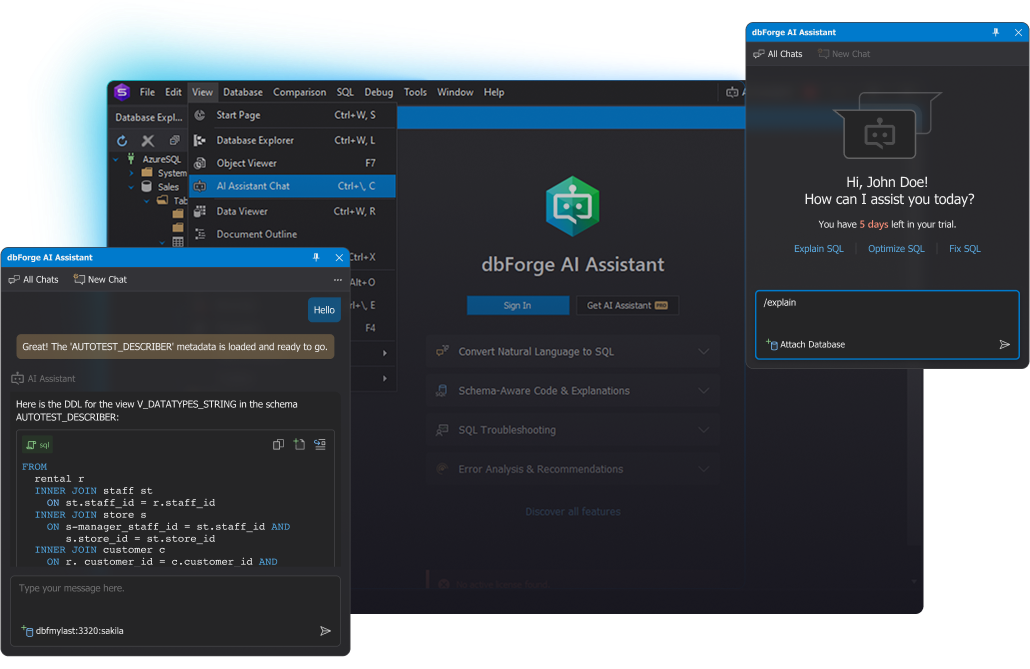
dbForge AI Assistant is a high-end AI tool for SQL coding that perfectly addresses the needs of both individual developers and entire teams operating with databases and business data.
Faster SQL development
With the Assistant, DBAs receive the best AI tool for SQL query optimization and troubleshooting. It has never been easier to keep database performance at an all-time high.
Productivity in administration
Analysts use SQL queries to retrieve and scrutinize data. Using dbForge AI Assistant, they can get valid queries of any complexity within moments—and run them right away.
Faster data retrieval for analysis
Get your firsthand experience with the AI Assistant for free—and then upgrade to get more tokens.
dbForge AI Assistant integrates with various dbForge products, from all-in-one IDEs to specialized database applications. Choose any for your daily tasks, and the AI Assistant will be a great guide.

A high-end IDE that covers nearly every aspect of work with SQL Server and Azure SQL

The ultimate add-in to level up your SQL development in SSMS and Visual Studio

A bundle of 15 essential tools and add-ins for SSMS and Visual Studio

A feature-rich IDE that simplifies the management of Oracle databases

An all-in-one IDE that helps develop and manage MySQL and MariaDB databases

A powerful IDE for PostgreSQL, Supabase, Amazon Redshift, and related cloud services

A unified solution for managing the entire database lifecycle across multiple systems and cloud services
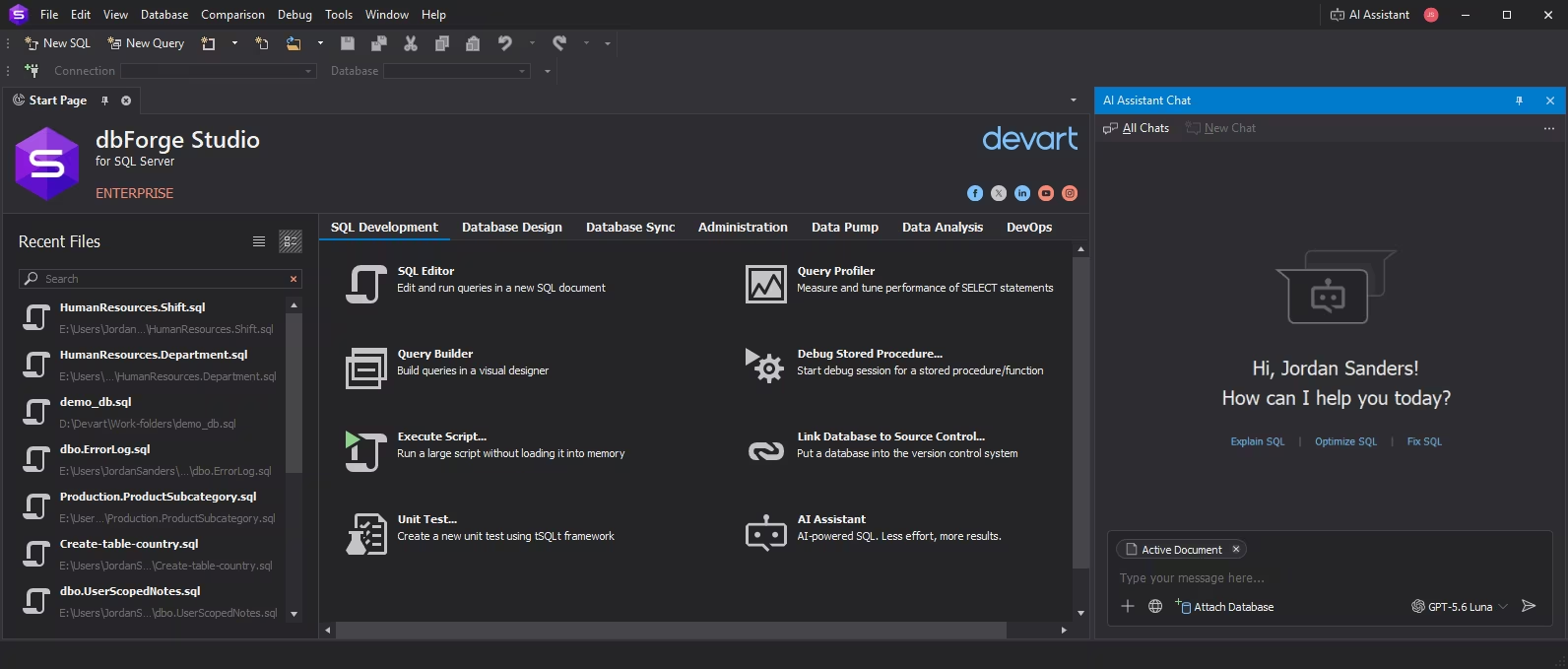
dbForge AI Assistant is seamlessly integrated into your current dbForge product. Simply launch that product, activate your AI Assistant license, and you're all set to start your work with it.
Your account conveniently delivers instant access to the purchased products, licenses, tech support, exclusive offers from Devart, and more.
Make sure you have a valid, active license for the dbForge product that you want to use dbForge AI Assistant with.
Launch your dbForge product and open the AI Assistant from the main toolbar. Next, you can either start a free 14-day trial or purchase a license.
The dbForge product must be updated to version 2025.1 (or later).
Available
Key features:
Starts from
All features from Express +
If writing SQL code is part of your daily work, you won't be surprised by smart code completion or as-you-type syntax validation. But now we offer you a step forward. Instant generation of context-aware queries based on natural language input. Automated code analysis and optimization. Real-time consultations on everything SQL. You can have it all with dbForge AI Assistant at your service. And that's why users around the world love it.


dbForge AI Assistant is integrated into multiple dbForge products and designed as the ultimate AI tool for SQL Server, MySQL, MariaDB, Oracle, PostgreSQL, and a number of related databases.
The AI Assistant is focused on generating, fixing, explaning, and optimizing SQL queries, as well as getting AI-powered guidance on everything SQL.
AI is getting progressively better all the time, and we had the idea of making a smart assistant that would help users auto-generate error-free queries, optimize manually written queries, and give consultations on any SQL-related issues directly from dbForge products.
dbForge AI Assistant is a worthwhile competitor to any other built-in AI assistant. It is context-aware and well-versed in everything related to SQL and databases. Additionally, it is integrated with the dbForge product documentation, and, if asked, will guide you on any requested topic.
Yes. You can input a query, and the Assistant will be able to analyze it, locate errors, if any, and suggest improvements that will help boost its performance. You can also attach a database and thus empower the Assistant with its context (including index metadata) to create relevant queries.
Yes, that's one of its primary purposes. It generates context-aware SQL queries that you can further review, copy to SQL Editor, tweak to your preferences, if necessary, and run against your databases.
Yes, the Assistant can handle queries of any complexity. Still, we recommend reviewing complex queries before executing them, just to make sure you are getting exactly what you need.
The Assistant utilizes AI to optimize queries in order to make them more effective and less expensive in terms of execution. The workflow is simple: you give the Assistant a query, and in return you get optimization suggestions. And if you need even more precise and relevant suggestions within the context of a particular database, just attach it and thus let the Assistant read its metadata (including index information) and generate answers based on it.
If you have a query that doesn't work as expected, you can show it to the Assistant. Additionally, if you get an error, you can ask the Assistant to explain and fix it. Your troubleshooting will be done in a few clicks.
dbForge AI Assistant is directly integrated into multiple dbForge products and can be accessed from there.
Sure! You can ask the Assistant to explain any specific query or ask any general SQL-related question to get a helpful answer.
The best thing is that you don't have to know SQL to build queries with the Assistant. Thanks to its ability to convert natural language to SQL, you are free to express your requests in any way, like "Give me a list of all employees from the sales department whose last names begin with A, B, or C"—and the Assistant will examine the metadata of your database and give you a working query that, if executed, will return the said list.
dbForge AI Assistant relies on the context of your conversation. Including more details in your questions might help the Assistant understand you better. For further convenience, you can attach any required database and thus provide the Assistant with its metadata so it can generate relevant answers based on it.
dbForge AI Assistant is based on LLMs by OpenAI and Anthropic and is available under their terms and conditions. The Assistant does not have access to the actual data of your databases, only to the metadata (for context purposes). The information stored on the server is strictly limited to your conversation with the Assistant.
No, it won't. And we'd like to reiterate that, besides your actual conversation with the Assistant, nothing is stored on the server.
Yes, the Assistant generates secure SQL code. Nevertheless, you should double-check it before execution to make sure you are getting exactly what you need.
dbForge AI Assistant currently uses LLMs by OpenAI (GPT-5.4, GPT-5.5) and Anthropic (Claude Haiku 4.5, Claude Sonnet 4.6, Claude Sonnet 5).
No, it doesn't.
dbForge AI Assistant is an integrated feature of multiple dbForge products, and you cannot uninstall it completely. The Assistant can be enabled—when you activate it for a trial or purchase a license for it—but you can just as easily disable it at any given moment.
Go to your dbForge product and open the AI Assistant. Attach the required database, and the Assistant will take a few moments to learn the context via its metadata. After that, you are free to begin your conversation.
Yes, the 14-day trial period is available only once. You can use it to explore the capabilities of the Assistant and see whether it's helpful in daily work.
Yes, there is a completely free plan that is perfectly suitable for getting acquainted with the capabilities of dbForge AI Assistant.
Both free and paid plans provide the complete feature set, including context-aware SQL generation, optimization, explanations, and troubleshooting; error analysis and recommendations; and an AI chat for everything related to SQL and databases with integrated web search. The only difference is the number of available tokens per month: 200,000 for the free plan, which can be substantially upgraded to 20 million for the paid plan.
Sure! You can easily upgrade to a paid plan to level up the number of available tokens per month. 20 million tokens is sufficient for intensive usage.
The paid version of dbForge AI Assistant requires a separate license; it is not included in the licenses of other dbForge products. Note that the Assistant is available as a free SQL AI tool as well.
Yes, you can go to your dbForge product and either enable the free edition of the Assistant or purchase a license for it.
Yes, dbForge AI Assistant is available in the Express editions of dbForge products under the same conditions as in the paid editions.
The Assistant is available as a free AI tool for SQL query generation; the said free plan includes 200,000 tokens per month. The paid plan boosts this number up to 20 million tokens per month, which is quite enough even for intensive usage..
No. Once you purchase a license for the Assistant under your Devart account, it will apply to all compatible dbForge products associated with the said account.
No, the Assistant is an integrated feature of dbForge products and is not available as a standalone application.
No, you need only one license for the Assistant, which can further be used with all compatible dbForge products you have purchased.
Volume discounts are possible, but it depends on your particular case. You can contact our sales department for further information.
dbForge products, including the Assistant, might be unavailable in terrorist states like the Russian Federation. We do not wish to fund warmongers.
dbForge AI Assistant comes deactivated by default and can be activated under a free or paid plan.
This depends on the policies of your organization, especially those that concern sensitive data. If these policies don't clash with the terms and conditions of OpenAI and/or Anthropic, and if your organization is using dbForge products, you can easily use the Assistant along with them.
If something goes wrong, you can send us a dump of your chat with the AI Assistant, and we will scrutinize it and see what can be improved. And as usual, we would appreciate any kind of feedback you would like to send us.

Here's all it takes to reinvent your routine SQL development today! Start using dbForge AI Assistant for free and experience its powerful capabilities in action.

Take note that we provide flexible purchasing options, which include bulk discounts on multiple licenses, to meet the budget of each and every customer.

If you need any help with dbForge AI Assistant or have questions about other dbForge products, just get in touch with us. Our response won't keep you waiting.